#1 iPhone location changer

Change where your iPhone says you are.
Made for the apps that keep tabs.

  • Life360
  • Find My
  • Findmykids
  • Google Family Link
  • Bark
  • Qustodio
  • Greenlight

Anywhere, in one tap.

Our parents grew up without a dot on a map following them everywhere, and they turned out fine. Search a place or drop a pin, and your iPhone is there until you say otherwise. The 1980s, back.

PinDrift on an iPhone showing the globe with a pin in Antarctica.

Draw a route. PinDrift drives it.

Add stops, follow real roads, and pick a speed: walking, cycling or driving. Loop it and let it run.

The stop list for the same route, each stop reorderable. A seven-stop route drawn through downtown Miami in PinDrift.

Anti-Speed™ keeps you under the limit.

Doing 131 in a 55? Apps see 52. PinDrift reads the posted limit for the road you are on and holds the speed you report at it, while your real position stays live.

Works on Life360

Included in every paid plan.

Anti-Speed on an iPhone: reported 52 mph, actual 131 mph, holding at the 55 mph limit.

Set it and leave.

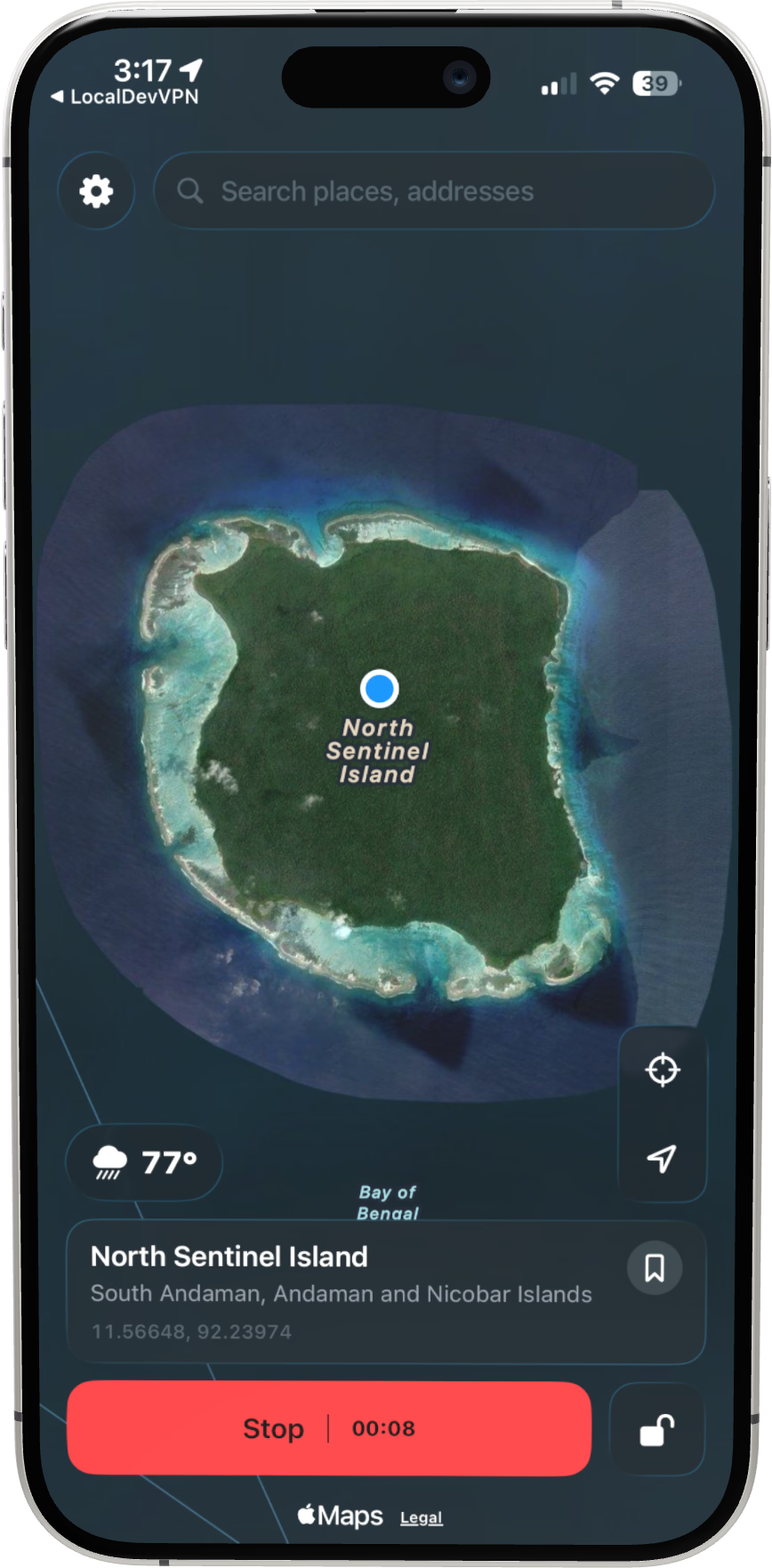
Start a spoof and put the phone in your pocket. It holds until you stop it, and stopping puts your real location back instantly.

A spoof running in PinDrift, the pin out in the Indian Ocean, with a stop button and timer. Apple Maps on the same iPhone, putting the blue dot in the Indian Ocean.

Your iPhone stays your iPhone.

No jailbreak, ever

Nothing on iOS is modified. You switch on Developer Mode, Apple’s own toggle, and switch it off again whenever you like.

Your places stay yours

At PinDrift we believe in clean software and private data. The places you pick are never recorded.

Fully reversible

Stop, and your real location is back at once. Delete the app like any other and nothing is left behind.

Works everywhere.

Windows, Mac, iPhone and Android, all on the same purchase. Switch computers whenever you like.

Windows

Windows 10 or 11.

Download for Windows

64-bit installer. Free to try.

Mac

macOS 13 or later.

Download for Mac

iPhone

iOS 17 or later.

Try PinDrift free

Installed from your computer, once.

Android

Android 8 or later.

Download for Android

Installs on the phone. No computer.

One price. Everything included.

Every plan has the desktop app, the iPhone app and the Android app.

Try it free · $0

30 minutes a day on the iPhone and Android apps. No card, no account.

Try PinDrift free

Save 44%

$5 /mo

$60 USD a year. Cancel anytime.

What you get

  • The iPhone app
  • The Android app
  • Windows and Mac
  • Every future update

What it does

  • Teleport anywhere
  • Walk, cycle and drive routes
  • Anti-Speed
  • Wireless after one pairing
Advanced Spoofing in the iPhone appYearly and Lifetime Life360, Snapchat and Find My keep changing what they look at. Advanced Spoofing only keeps working because we keep engineering it, week after week, so it sits on the plans that pay for that work.

Tax included where it applies. Your card goes to Stripe and never touches PinDrift. Terms.

Prefer to use your PC?

1

Download PinDrift

Windows or Mac. No account to create, nothing to configure.

2

Plug in your iPhone

Once over USB. After that it connects over Wi-Fi.

3

Drop a pin. Spoof.

Teleport, routes and Anti-Speed, on the big screen.

The PinDrift desktop app: the Teleport panel with Times Square entered, over a satellite world map.

The desktop app does everything the phone does, and it is what puts PinDrift on your iPhone.

Ask in the Discord, we answer there ourselves.

Join the Discord

Questions, answered.

What is PinDrift?
PinDrift is an iPhone location changer. It sets the GPS location your iPhone reports to the apps on it. You can teleport to any point on a map, or move along a route you draw at a walking, cycling or driving speed. It runs on Windows, Mac, iPhone and Android, and it needs no jailbreak.
Does it need a jailbreak?
No. PinDrift uses Developer Mode, which Apple added in iOS 16, and it requires iOS 17 or later. Nothing on the iPhone is removed, replaced or unlocked, and you can turn Developer Mode off again whenever you like.
Do I need a computer?
Once, to install the iPhone app. Apple does not let a website put an app on an iPhone, so the desktop app does it over USB. After that the phone holds and moves its own location, and it renews itself from inside the app. The Android app installs on the phone directly.
Why does it ask for my Apple ID?
Apple only lets an app be installed this way when it is signed with an Apple ID. Your password is checked by Apple without being sent anywhere, and PinDrift's servers never receive it. The desktop app keeps it in your computer's own keychain so it can renew the iPhone app every week, and signing out deletes it. PinDrift's Apple sign-in is built on isideload, an open-source library (MIT licence, github.com/nab138/isideload) that anyone can read. It signs in with Apple's own secure method (SRP), in which the password is never sent, not even to Apple: your device proves it knows it.
Is there really a free trial?
Yes, and it does not ask for a card or an account. You get 30 minutes of active spoofing a day on the iPhone and Android apps. The clock only runs while a spoof is running, and it resets the next day.
What is the difference between the plans?
How long it lasts, what you pay, and one feature. All three include the desktop app, the iPhone app, the Android app and every future update. Advanced Spoofing in the iPhone app is part of Yearly and Lifetime, not Monthly. Monthly and Yearly renew until you cancel. Lifetime is one payment.
Which devices are supported?
Any iPhone on iOS 17 or later. Windows 10 or 11 (64-bit), macOS 13 or later on Apple Silicon or Intel, and Android 8 or later. iPad is not supported.
Can I move it to a new computer?
Yes. One computer is active at a time, and moving is free. A move starts a 180-day cooldown before the next one, so a licence cannot be passed around.
What happens if I cancel?
Nothing until the term you paid for ends. Cancelling stops the next payment, and the app keeps working until the date you already paid through.
Is my card safe?
Your card details go straight to Stripe and never reach PinDrift. The fields you type into are Stripe’s, inside our page.

Somewhere else, starting now.

Install PinDrift once. Then take the phone wherever you want to be.